Rental messages
Version: Process description SALES005 v2
1 Introduction
This manual contains the general playing rules for companies within the construction and installation sector who wish to exchange standardised and electronic messages that concern the leasing of matters and material. This is a sector-specific document regarding the rental messages and has a connection with other processing areas (data messages, transaction messages and maintenance messages) en contains the general information on electronic communication and the operating rules. Within the construction and installation sector, DICO XML-messages are used.
1.1 The rental messages within the DICO Standaard
The DICO Standaard comprises different sub-areas where the messages can be employed. The rental messages (red) overlap with the Data-message set (blue) and the Transaction-message set (green). The Dico Standaard furthmore knows the Maintenance messages (orange).
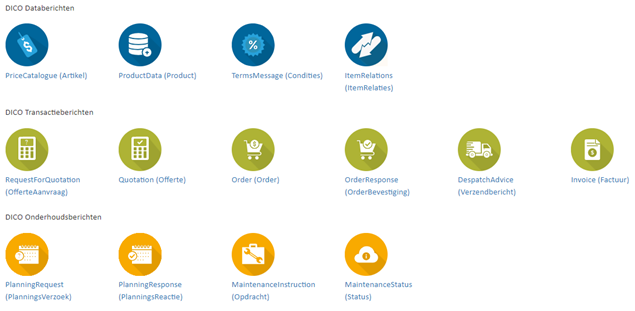
Figure 1 – Current messages in the DICO Standard
The rental messages know two new messages, namely the Checkout and the CheckoutResponse. In this document it is attempted to describe the entire rental process in the SALES005. The relations between the different SALES005 messages are included in this as well and shall be explained.
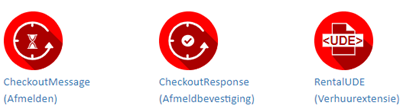
Figure 2 – New rental messages in the DICO Standard
1.2 What is the purpose of this document?
In this document, you will find the overarching agreements that have been made within the industry on the usage of the DICO XML rental messages. This processing model is meant for the rental messages and provides an overview of the playing rules that are in force within the DICO Standaard.
1.3 Which documents are included in the user’s documentation?
The user’s documentation for rental messages consists of two documents: a process description (this document) for the rental messages and a technical document. Other (technical) information is published on Semantic Treehouse. Here, one can find, among others, sample messages, as well as tools, such as a validation tools used for the validation of messages.
The documentation has been composed with great care; if there happen to be any inconsistencies or ambiguities, prental contact Ketenstandaard for clarification. Please do not come up with an interpretation on your own, to avoid the coming into being various dialects of the standard.
The documentation describes the scope, process and technical assumptions of the DICO Standaard. Its structure, contents and operating rules are further elaborated upon in Semantic Treehouse. Finalised DICO XML messages should adhere to the delineated demands. For the factual exchange of DICO messages, a license is required. For more information and the general terms and conditions for use, please refer to Ketenstandaard.
1.4 Contributors
This document is maintained by Ketenstandaard Bouw en Techniek. Ketenstandaard Bouw en Techniek magages the DICO Standaard and facilitates DICO Committees for the Contrusction and Installation sector. Companies from the sector are represented within these committees, which ascertains the connection with the need for information from the sector.
For any further questions or comments on this document, please contact dico@ketenstandaard.nl.
2 The overall process
The rental messages are an additional tot he current DICO messages and processes within the SALES005 version. The figure below illustrates clearly how the different message are related to one another and comprises the entire rental process. For example, the invoice message is the SALES005 invoice that is placed under the DICO transaction messages. The relevance of the DICO messages increases if the entire process is followed through.
The rules of the existing DICO messages stay in place. If there are any contradictions that arise when using the rental extension, and thus this process description, the process description of the rental extension takes precedence over existing messages.
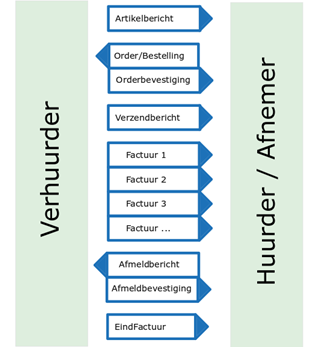
Figure 3 – An example of the new message flow within the rental process
The Checkout and CheckoutResponse have been added to the SALES005 as new messages. These two messages are used for a standardised concluding of the rental process. Halting rented material, or information regarding the pick-up time of material are examples. The rental of material knows so many variables that it cannot be presumed that the invoice(s) can be matched indiscriminately with the original order. The software itself shall have to comprise a ‘dossier’ to facilitate the matching.
A rental period usually comprises several (invoice) terms, the process being concluded eventually with a final invoice. The duration of the rental period as indicated via the order might deviate from the duration that is billed. The process is depicted in time. See the figure below:
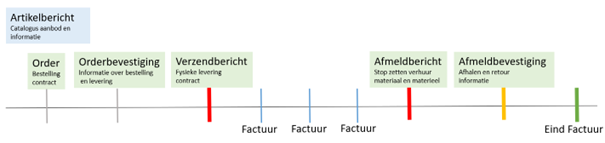 Figure 4 – Rentalmessages timeline
3 Exchange master data
The process commences with the exchange of master data. In this chapter we will discuss two sets of data messages; the product and article message of the SALES005. Within DICO a product is defined as something that has user characteristics and an article as something that has trade characteristics. In this context, the article thus has the characteristics that represent rental conditions and the product depicts the user’s possibilities that the rented product might offer.
3.1 Product message
3.1.1 Classification of products
The classification of products is done via the ETIM Classification. There are no additions as compared to the current product message. The characteristics of a product are the same in the rental process as they are in other processes. Naturally, the information on the characteristics of products is of great importance. In this manner, the buyer is correctly informed on the diverse product characteristics, so that the buyer is able to make an informed purchase. Example: Vibrating plate compactor with all relevant (ETIM) characteristics:
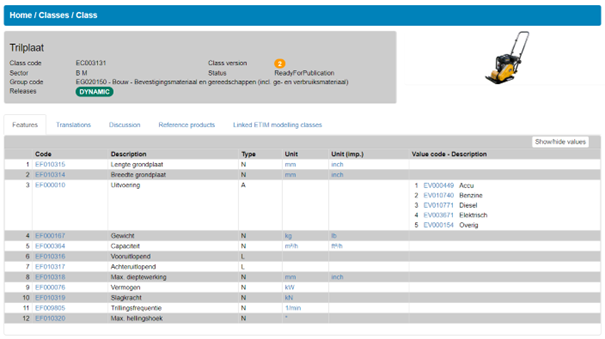
Figure 5 – The ETIM characteristics of a vibrating plate compactor
3.2 Article message
The article message provides the products with trade data: an article is to be rented for a set price for a particular period of time. An important distinction from regular articles lies in the fact that there is a fixed term, rather than a transferral of ownership. Please note that the price is determined based on two components: price per piece and price for a period of time. It is furthermore possible to include various descriptions within the article message, such as a marketing text. Via the message, more information on the article can be provided, such as information on the stock, measurements and delivery.
Attention should be paid to the manner in which article data is to be filled out, to ensure standardised communications on an article to is up for rental. To facilitate this, a rental extension has been developed, which requires the communication on periods in time and price per period for an article. This rental extension must be used when it concerns articles that can be rented. If this rental extension would not be used, the buyer would not be aware of the fact that it concerns an article that is up for rental.
3.2.1 An article’s line: indicating one or more articles

The indication of article information at the line of a particular article that is up for rental is performed slightly different in the SALES005 as compared to ‘normal’ articles. The differences are found primarily in the application of the operating rules and the extensions. In the table below it is illustrated how important fields are used with the leasing of articles. The agreement is that the fields in the table depicted below are always filled out as ‘per piece’ (PCE). In <UseUnitInformation> it is possible to provide additioinal information if necessary, for example for the specific measurements or other information for the user.
Table 1 – Example one crowd barrier, fill out article data
| Elements | XML field | Explanation |
|---|---|---|
| Price per unit | <PriceBasisUoM> | For the rental, this is always indicated per piece (PCE). Example: 1 PCE crowd barrier or 100 PCE crowd barriers. |
| Purchase unit | <OrderUoM> | The purchase unit is indicated per piece (PCE) as well. |
| Minimum purchase unit | <MinimumOrderPeriod> | The minimmum number of articles that can be purchased is indicated per piece (PCE) as well. |
When leasing articles, two units are indicated. Example: the leasing of a vibrating plate compactor or crowd barrier. It should be indicated how many articles are tob e rented, as well as for what period of time. This means that it is necessary to provide an additional rental extension in the SALES005 article message.
3.2.2 Price determination
The price of the article that is up for rental is indicated in the rental extension. This means that in the regular price structure, there is no longer a <GrossPrice>, <NetPrice> of <SuggestedPrice> indicated when making use of the rental extension. As such, the operating rule “If ‘indication price upon request’ is not equivalent to ‘true’, than it is mandatory to enter the ‘gross price’ or the ‘nett price’.” for the field <PriceOnRequestIndicator> no longer applies when using the rental extension. Multiple prices can be included in the rental extension by indicating in the structure <PricePerRentalTime> how the price is related to the rental period. Example: leasing a crowd barrier for 1 week costs €700.
In order to obtain a decent determination of the price, there are some basic rules:
- The
<PriceBasisUoM>is always indicated per piece (PCE), as it always concerns a specific amount of the rented article; a number of pieces of something. So, amounts in the price are always indicated per piece. - The
<PriceBasisUoM>should always be equal to the<OrderUoM>. - Based on this, the
<PriceToOrderUnitFactor>is always 1. - The
<NumberOfUnitsInPriceBasis>should always be equal to the<PeriodMultiple>. - The
<MinimumOrderPeriod>must be more than the<PeriodMultiple>. - Reductions can only be indicated in percentages, as they are applicable to all indicated prices in the extension.
Following the determination of the price, in order to reach a total price for a particular order, the formulae displayed below is to be followed:
(number of ordered leasable articles)
---------------------------------------------------- (price rental period number of periods) = Total price
(number based on price)
The number of periods is indicated through transfroming <RentalPeriod> into the correct <PeriodQuantity> in relation to <PeriodUoM>.
In order to provide a better overview of the price determination, some examples are listed below. The first column indicates a fictituous order (the monetary amounts are, naturally, fictituous as well). Usually, this only happens in the order itself, with the requirements being listed and exchanged via the article message.
Table 2 – Examples price determination, part 1
| Order | Data | Example calculations |
|---|---|---|
| 1 vibrating plate compactor for 1 week | PeriodMultiple = 1 MinimumOrderPeriod = 1 NumberOfUnitsInPriceBasis = 1 Extension: rental:PeriodQuantity = 1 rental:PeriodUoM = Week rental:Price = €700 | (1 vibrating plate compactor PCE) ----------------------------- (700 price 1) = €700 (1 amount based on price) |
| 2 vibrating plate compactors for 3 weeks | PeriodMultiple = 1 MinimumOrderPeriod = 1 NumberOfUnitsInPriceBasis = 1 Extension: rental:PeriodQuantity = 1 rental:PeriodUoM = Week rental:Price = €700 | (2 vibrating plate compactors PCE) ----------------------------- (€700 price 3) =€4200 (1 amount based on price) |
| 100 crowd barriers for 8 days | PeriodMultiple = 1 MinimumOrderPeriod = 1 NumberOfUnitsInPriceBasis = 1 Extension: rental:PeriodQuantity = 1 rental:PeriodUoM = Day rental:Price = €5 | (100 crowd barriers PCE) ----------------------------- (€5 price 8) = €4000 (1 amount based on price) |
| 50 crowd barriers for 2 weeks | PeriodMultiple = 10 MinimumOrderPeriod = 20 NumberOfUnitsInPriceBasis = 10 Extension: rental:PeriodQuantity = 1 rental:PeriodUoM = Week rental:Price = €50 | (50 crowd barriers PCE ) ----------------------------- (€50 price 2) = €500 (10 amount based on price) |
Table 3 – Examples price determination, part 2
| Order | Data | Example calculations |
|---|---|---|
| 19 crowd barriers for 2 weeks | PeriodMultiple = 10 MinimumOrderPeriod = 20 NumberOfUnitsInPriceBasis = 10 Extension: rental:PeriodQuantity = 1 rental:PeriodUoM = Week rental:Price = €50 | Does not satisfy the MinimumOrderPeriod and PeriodMultiple |
| 50 crowd barriers for 6 weeks | PeriodMultiple = 10 MinimumOrderPeriod = 20 NumberOfUnitsInPriceBasis = 10 Extension: rental:PeriodQuantity = 2 rental:PeriodUoM = Week rental:Price = €75 | (50 crowd barriers PCE ) ----------------------------- (€75 price 3)= €1250 (10 amount based on price) |
3.2.3 Volume discounts
When using volume discounts to provide a discount with particular amounts in the order (number of units bought and periods), some additional rules apply to eventually reach the correct price:
- Displaying volume discounts in number of units bought is possible via the structuring of the regulat discount. It is important here to only enter the percentage. The discounts are, for technical reasons, applicable to all indicated prices.
- The indicating of volume discounts for periods of rental is possible via the extension. Here, multiple periods and corresponding prices can be indicated.
- Volume discounts are to be approached from large to small: a volume discount for a larger unit/number takes precedence over a smaller one. This does not mean that smaller volume discounts are not valid. One should thus divide the rental period until the entire period is calculated (see the example in table 6). When using multiple volume discounts, the software shall need various steps to calculate the correct price. The price cannot be deduced from one singular field.
- Volume discounts with percentage and period can be used together, but this is, of course, something that should not be done.
Table 4 – Example volume discount with percentage
| Order | Data | Example calculations |
|---|---|---|
| 150 crowd barriers for 2 weeks | PeriodMultiple = 10 MinimumOrderPeriod = 10 NumberOfUnitsInPriceBasis = 1 AllowancePercentage = 5% BracketLowerLimit = 100 Extensie: rental:PeriodQuantity = 1 rental:PeriodUoM = Week rental:Price = €4 | (150 crowd barriers PCE) ----------------------------- (€4 price 2) = €1200 (1 amount based on price) €1200 * 0.95 (volume discount) = €1140 |
Table 5 – Example volume discount with set period
| Order | Data | Example calculations |
|---|---|---|
| vibrating plate compactors for 1 year and 12 days | The largest possible volume discount will be chosen, which indicates the lowest (total) price. PeriodMultiple = 1 MinimumOrderPeriod = 1 NumberOfUnitsInPriceBasis = 1 Extensie: rental:PeriodQuantity = 1 rental:PeriodUoM = Day rental:Price = €4 rental:PeriodQuantity = 1 rental:PeriodUoM = Week rental:Price = €21 rental:PeriodQuantity = 1 rental:PeriodUoM = Year rental:Price = €1000 | Total price a per 1 year: (3 vibrating plate compactors PCE) --------------------------- (€1000 price 1) = €3000 (1 amount based on price) Total price a 1 week: (3 vibrating plate compactors PCE) --------------------------- (€21 price 1) = €63 (1 amount based on price) Total price a 1 day: (3 vibrating plate compactors PCE) --------------------------- (€4 price 5) = €60 (1 amount based on price) The total rental price for 3 vibrating plate compactors for 1 year and 12 days is: €3123 |
3.2.4 Article groups
In case the price is determined via an article group, articles can be grouped via the field <BuyingGroup> within the structure <TradeItemGrouping> per article line. For this, a code corresponding to the group must be provided for by the supplier, please be aware here of the limited amount of space in the field <BuyingGroup>. Via this code, the software of the buyer can group the articles. This is to ascertain that the current article message remains intact to the largest extent possible.
3.3 Item-relation message and Condition message
The condition message concerns the price determination and can be applied. The discounts and volume discounts are applied in the same manner as indicated in paragraph 3.2.4, table 5 in this document. These discounts are thus related to the total price of the order. The discounts indicated in the condition message take precedence over the indicated total price of the article message, please refer to the process description Data messages, paragraph 5.3.4. Just as with the article message, only percentages can be used to indicate discounts.
The structure <PriceInformation> is not used in the condition message. As such, there are, generally, two methods for the implementation of discounts. They can be applied either via the article message, or via the condition message. It is recommended to use only one method and stick to this one.
The item-relation message can, as it is currently formulated, used to indicate relations between articles or products: “which grinding wheel fits upon an angle grinder?” and “protective gear inherently belongs with a construction crane.”
4 Ordering
4.1 Order messate and Order confirmation
After the exchange of master data (directly or via a datapool), articles are ordered for a particular (rental) period. This chapter shall consider in more detail the relation between the rental process and the DICO transaction messages (version SALES005).
4.1.1 To order rental article(s)
Tabel 6 – Points of interest in the order
| Elements | XML field or structure | Explanation |
|---|---|---|
| Amount ordered | <OrderedQuantity> | The amount ordered in the order is always indicated per piece (PCE). |
| Planned amount to be delivered | <PlannedDeliveryQuantity> | In the confirmation, the planned amount to be delivered is always indicated per piece (PCE) as well. |
| Planned amount to be delivered | <DeliveryDateTimeInformation> | This structure is included in the order and confirmation to indicate the delivery of the article. Not the rental period. |
When ordering articles to be rented, it is necessary to include a rental extension. So, just as in the article message, the order and confirmation include a rental extension at line level as well. In the rental extension the rental period is further specified. Indicating the period happens via the dates and is transformed by the software into the correct periods that correspond with the article message.
Do mind: when ordering articles, not rental articles, please follow the standard rules for the messages within the current SALES005 version.
4.1.2 Confirming the order
The order confirmation can in its existent form be used, including the applicable lines. But, the rental extension is of great importance in the order confirmation as well. For, if a confirmation were to be sent with a modification in the order itself, this will have to be included as well. Analogous to the example in the paragraph “Ordering rental article(s)”, the rental extension can be used to confirm that the rental period should not be 100 days, but 80 days. Of course, these type of procedures related to modifications are subject to agreements internal to the project and contractual relations.
The extension can be used in the order confirmation not just for the rental period, but also for the traceability of prices. The traceability of the order confirmation to the invoice does depend on a number of other factors. Please refer to chapter 7 “Final financial handling” for further information.
4.1.3 Modifying the order
Both the customer and supplier can make modifications in the order. This might include changing the delivery date, amount or splitting the order over various enterprises. The SALES005 for articles does not contain a specific process for electronic cancellation of an order. In order to ensure a smooth operation of these process, various agreements have been made.
- The order can be modified via the sending of a new message (order confirmation or order) with the same
<OrderNumber>and a new<OrderDate>. The agreement is made that the most recently dated message is leading. - An order confirmation can be modified via a new message with the same
<OrderResponseNumber>and<OrderReference>. The agreement is made that the most recently dated message is leading. - As per paragraph 6.1.1 of the process description Transaction message, some fields can be modified. The following data can be modified in addition to this:
<rental:RentalPeriod>. - The cancellation of an order shall always have to occur bilaterally, e.g. via the telephone. Both parties will then have to process the cancellation in their systems manually.
5 Delivery
The delivery message indicates which and when ordered (rental) articles should be delivered. The delivery is usually the starting point of the rental period. This need not always be the case, however, for example: if for logistic reasons the rented article is delivered before the rental period is to commence.
5.1.1 Rental article(s) in the forwarding message
Table 7 – Points of attention in the order
| Elements | XML field or structure | Explanation |
|---|---|---|
| Amount delivered | <DeliveredQuantity> | The amount of delivered rental articles is, with rentals, always indicated per piece (PCE). |
| Data regarding the delivery | <DeliveryDateTimeInformation> | This structure is included in the forwarding message and indicates the delivery of the articles. Not the rental period. |
An expansion of the forwarding message is possible with the delivery as well. Confirming the rental period is possible in the forwarding message, but not a strict requirement; the order confirmation is sufficient. If, however, it is necessary to do so, because of an interim modification, this can occur via the extension. The rental extension is identical to the rental extension in the order and/or confirmation.
5.1.2 Inspection reports of a rental article(s)
Inspection reports are included in the forwarding message. This can be done via the attachments/certificates structure. In the message, a report can be included at line level. At the line, a serial number can be included. If for multiple articles situated at one line different inspection reports are of relevance, then these articles will have to be divided over multiple item-lines. This to ascertain that the corresponding link with the serial number remains intact.
6 Returning the article
For the returning of articles, the retour is regulated in two new messages. The Checkout message is used to indicate when the rental period is to be halted by the lessee. And the CheckoutResponse is used to confirm the factual ending of the rental period by the lessor. Checkout and CheckoutResponse can be used at interim moments to reconfirm the rental period and/or to partly obtain the rented articles. Fuel settlements and possible damages, for example, can be communicated in this manner as well. It can be used to keep the parties informed and to facilitate part of the matching at the level of the invoice. Using these messages to convey information contributes to adequate dossier-compilation for both parties.
6.1 Checkout
With the Checkout message, a request for the determination of the final date for the rental period of the articles can be communicated. The end of the period provides for the opportunity to send a (finalised) invoice, please refer to chapter 7. It is not obligatory to send a Checkout message before a CheckoutResponse, as cancellation can occur via the telephone as well. When using the Checkout message, some basic rules are applicable:
- Upon delivery at a front desk, that will be considered the specific moment of cancellation.
- The moment of cancellation describes a requirest by the lessee to the lessor to stop the rental period.
- The Checkout message refers always to the same order.
- Rental articles situated at the same line can be cancelled separately. Example: 2 portable toilets are rented, with 1 being cancelled 1 one before the other.
- When returning an article at a front desk, a Checkout message can be sent, but this is no strict requirement.
- Upon cancellation, only one location can be indicated.
6.2 CheckoutResponse
With the CheckoutResponse the end date of the rental period of the articles is determined. The message is used to confirm the cancellation of the rental period to the customer. Next to this, the agreed upon pick-up date can be confirmed, daily tariffs calculated and damage claims can be communicated. When using CheckoutResponse, some basic rules are applicable:
- A CheckoutResponse can be send for:
- Confirmation of the
<rental:CheckoutDateTime>; - And/or modification of the
<rental:CheckoutDateTime>; - And/or confirmation of the
<rental:PickupDateTimeInformation>; - And/or modification of the
<rental:PickupDateTimeInformation>; - And/or a confirmation of the factual pick-up of the rented articles.
- The CheckoutResponse always refers to the same order.
- When a modification occurs in the
<rental:CheckoutDateTime>or<rental:PickupDateTimeInformation>in the CheckoutResponse with which the other party does not agree, bilateral agreements will have to be made. - The moment of cancellation does not need to correspond with the moment of delivery of the lessee or the pick-up moment of the lessor.
- The final CheckoutResponse is leading.
- Upon delivery by the lesee to the lessor, the lessor sends a CheckoutResponse as well. In here, any damage that has been noted can be communicated.
- One or more CheckoutResponse messages will always follow after a Checkout.
6.2.1 Price determination
If subsequent payments relating to petrol, weathering or other premiums that can only be determined afterwards are of relevance, one could use the Charge structure. This way, a match can be made with the rented article. At the moment that this is included as a separate line, the corresponding traceability with the rented article expires. If waiting hours for the driver are calculated, this is to indicated in the CheckoutResponse. ‘Waiting hours’ can be included as an article/service within the article message.
6.2.2 Daily tariffs
With “daily tariffs” reference is made to the prices for usage articles, that may come with a price that varies per day. An example would be fuel, where the day in which payment is made for the fuel is of importance as this might influence the price. How to determine the relevant daily tariffs is an agreement made between the parties. Communicating the daily tariff happens via the invoice and it should be assumed that the indicated daily tariff is correct. In the article message, the price is indicated as “price to be requested”, so an article number can be included.
6.2.3 Damage
Damage claims are to be agreed upon between the lessee and lessor. Per Checkout or CheckoutResponseLine an indication of the damage can be included, if such damage is noted by the lessee or lessor. This can include a description of the type of damage and an indication as to whether or not it was caused by the lessee. Attachments can be included, to allow the parties to inform one another on the ascertained damage. The party that first notes the damage is not generally indicated. The judicial and/or financial handling of the damage is to be agreed upon bilaterally.
7 Final financial handling
The final financial handling in the rental process differs from the normal process of payment of the articles. When leasing articles, the rental period is not always known beforehand. For the final financial handling this period is crucial in order to verify the amounts.
7.1 Invoice
The invoice is with the leasing of articles the final chapter. There might be interim invoices in the rental process as well, so-called periodical invoices. For example: article A is rented for 8 months. There will follow 8 periodical invoices, with the final period being concluded with a final invoice. The final period does not need to be a full month in order to qualify as a period.
Just aw with other messages in the leasing process, the invoice includes the rental extension. In the rental extension the rental period and prices are further specified. Because of a dual check on both sides, it is obligatory to include the <rental:RentalPeriod>. The <rental:RentalPeriod> on the invoice describes always the period of relevance for the invoice and not generally the entire rental period. Furthermore, it is necessary in order to determine the price per rented article to include in the extension for the invoice message the present <rental:PricePerRentalTime>.
Oversight onto the entire rental period should be kept by the software itself.
7.1.1 Determining the price
In order to determine the price, drie components are of relevance:
• The rental period <rental:RentalPeriod>
• The numer of rented articles <NumberOfInvoicingUnits>
• The price per rental period <rental:PricePerRentalTime>
An example to determine the price <Price> in order to reach a line <NetLineAmount>
Table 8 – Examples price determination invoice message
| Information | Example calculations |
|---|---|
| Example 1 Data invoice NumberOfInvoicingUnits = 2 Data extension rental:FixedStartDateTime = 2021-02-01T00:01:00+01:00 rental:FixedFinishDateTime = 2021-02-09T23:59:00+01:00 rental:WeekendInvoicing = True rental:PeriodQuantity = 1 rental:PeriodUoM = Week rental:Price = €10 rental:PeriodQuantity = 1 rental:PeriodUoM = Day rental:Price = €4 | Stap 1 = Berekenen periode • De begin en einddatum(tijd) bepalende de periode. • In dit geval bestaat een week uit 7 dagen (weekendInvoicing = true). Dat betekent dat de verhuurperiode in dit voorbeeld neerkomt op: 1 week en 1 dagen Stap 2 = Berekenen prijs 1 x ( 1 week á €10 ) = €10 1 x (1 dag á €4 ) = €4 Dus de prijs per gehuurd artikel is €52 voor deze factuur. Stap 3 = Berekenen factuurregelbedrag 2 x €14 = €28 |
| Example 2 Data invoice factuur NumberOfInvoicingUnits = 100 Data extension rental:FixedStartDateTime = 2021-03-03T00:01:00+01:00 rental:FixedFinishDateTime = 2021-03-29T23:59:00+01:00 rental:WeekendInvoicing = False rental:PeriodQuantity = 1 rental:PeriodUoM = Week rental:Price = €12 rental:PeriodQuantity = 1 rental:PeriodUoM = Day rental:Price = €2 | Step 1 = Calculating the period • The start and end date (time) determine the period. • In this case, a week consists of 7 days (weekendInvoicing = false). This means that the rental period in this example is: 3 weeks and 4 days. • days in the weekend are not included in the caluclation Step 2 = Calculating the price 3 x ( 1 week á €12 ) = €36 4 x (1 day á €2 ) = €8 Thus, the price per rented article is €44 for this invoice. Step 3 = Calculating the invoice-line amount 100 x €44 = €4400 |
7.1.2 Matching
The matching occurs via dossier-compilation in the software. With dossier-compilation it is meant that the software is tasked with keeping track of what is ordered, cancelled, paid for and/or not paid per order and, eventually, per order line. This is because the leasing of articles meant that the period that is ‘agreed upon’ beforehand (in the order) might not be the final period for rental eventually. The consequence is thus that the matching cannot occur solely on the basis of an order, order confirmation, forwarding message, Checkout or CheckoutResponse. For the use of the invoice, there are some basic rules:
- The
<rental:FixedStartDateTime>within<rental:RentalPeriod>on the final order confirmation or the final forwarding message in cominbation with the confirmed<CheckoutDateTime>on the Checkoutresponse leads to the final period for rental. - The
<rental:RentalPeriod>at the invoice line level describes the period that is relevant for this invoice line. This does not mean that it describes the entire rental period. - The rental extension that has been sent last before the invoice with
<rental:RentalPeriod>in the order confirmation or forwarding message determine the start date, which is used for determining the total leasing period. - If the start date is moved due to a diverging delivery, this is to be indicated in the forwarding message. In that case, the start date in the rental extension with
<rental:RentalPeriod>in the forwarding message is applicable. - With an interim cancellation, a direct matching with the number of rented articles with the order confirmation, order and/or forwarding message is no longer possible. As such, the matching shall occur by keeping track of various additions in the software (dossier-compilation).
- The matching of the CheckoutResponse with the invoice can only occur if the price-indicated fields in the response are correctly included in the following invoice as well. So, for example, in the response the corresponding weathering of the product, petrol costs are mentioned at line-level as a premium. If this is only indicated in the invoice, matching is not possible. In order to match a response with the invoice, a particular type for connections comes into existence (CheckoutResponse 1 match with invoice 1, etc.).
- The matching invoice to CheckoutResponse can only occur if the CheckoutResponse price describes the same rental period as the invoice price.
- As regards to billing, the software itself should keep track of whether or not periodical invoices have been sent/paid and which amount/lines should accordingly be blanks.
- The period for invoicing is not further specified in the process, as these agreements differ per customer. A reference to the corresponding contract number where these agreements are to be found can be include within the message.
7.1.3 Examples invoice matching
As described in chapter 6, the articles can be checked out during the process. Even in 1 open line, 1 of 2 articles can be checked out. In the examples illustrated below, it has been attempted to indicate how this process is put together in one order line encompassing several messages.
Table 9 – Example relations between DICO messages in the rental process at one order line
| Ex. 1: Happy-flow | Ex. 2: Invoice periods | Ex. 3: Multiple check-outs | |||||
|---|---|---|---|---|---|---|---|
| Number of articles | Message | Number of articles | Message | Number of articles | Message | ||
| 20 | Order Response | 25 | Order Response | 20 | Order Response | ||
| 20 | COResponse | 25 | Invoice 1 | 20 | Invoice 1 | ||
| 20 | (End)Invoice | 25 | Invoice 2 | 5 | COResponse | ||
| 25 | Invoice 3 | 5 | (Sub-end)Invoice 2 | ||||
| 25 | COResponse | 15 | Invoice 3 | ||||
| 25 | (End)Invoice 4 | 15 | COResponse | ||||
| 15 | (End)Invoice 4 |
Toelichting tabel:
Example 1:
In the happyflow 20 articles are confirmed (and thus delivered). All of these 20 articles are cancelled at the same moment and this is confirmed with the CheckoutResponce (COResponse). These 20 articles are invoiced afterwards.
Example 2:
Invoices over a particular period are forwarded after the commencement of the rental period after an agreed upon period of time. In the example, 4 invoices are forwarded with 3 interim invoices over a particular period and 1 final invoice.
Example 3:
5 articles are cancelled at the line level. These are concluded via a COResponse and, finally, a partly finalised invoice. The remaining 15 articles are subsequently placed on the third invoice period. Eventually, these final 15 articles are cancelled as well and invoiced via the final invoice. In practice, invoice 2 and 3 can be merged to form a combined-period invoice.